


Parameter Limitations and the Importance of Experience
Currently, FDM printing technology is increasingly mature, and equipment manufacturers have already provided stable baseline parameters. However, the final print quality is still influenced by multiple factors such as equipment condition, model quality, operating habits, and material characteristics. Relying solely on parameter settings cannot guarantee success. Moreover, different machines perform differently, and directly applying the same set of parameters across devices may actually lead to failure.
For this reason, most enthusiasts use the factory default parameters as a baseline and make adjustments based on their own needs—experience plays a crucial role here. The goal of this guide is to help beginners reduce the burden of parameter tuning at the slicing stage and improve print success rates, but it cannot replace the hands-on practice of equipment maintenance and in-process print observation.
Directions for Parameter Optimization
Slicer parameters are closely interrelated with print strength, print time, and surface quality. Optimizing one aspect often requires trade-offs in others. To help beginners master the entire workflow from modeling to printing, this guide adopts a categorized recommendation strategy: based on the printer’s default layer height, we provide tailored parameter packages and targeted optimizations for different types of models, aiming to improve both success rates and quality from the parameter perspective.
Risk Factor Analysis for FDM Print Failures
To support the argument that “experience matters more than parameters,” the table below summarizes common risk points across five areas—pre-print preparation, daily operations, maintenance, and parameter settings—along with their impact levels on print success. Risk levels are classified as: 🔴 High (very likely to cause failure), 🟡 Medium (may affect quality or success rate), 🟢 Low (minor impact, tolerable).
| Category | Risk Point | Impact Level | Description |
|---|---|---|---|
| Pre-print Preparation | Unleveled build plate | 🔴 High | Poor first-layer adhesion, leading to warping or detachment. |
| Pre-print Preparation | Dirty or contaminated build surface | 🟡 Medium | Reduces adhesion, may cause edge lifting or shifting. |
| Pre-print Preparation | Filament with high moisture content | 🟡 Medium | Causes stringing, bubbling, and poor interlayer bonding. |
| Daily Operations | Incorrect filament loading/unloading | 🟡 Medium | Can cause clogging or under-extrusion. |
| Daily Operations | Touching the build plate with bare hands | 🟢 Low | Leaves oils that slightly reduce adhesion (usually cleanable). |
| Maintenance | Worn or damaged nozzle | 🔴 High | Causes inconsistent extrusion and visible layer defects. |
| Maintenance | Loose belts or pulleys | 🔴 High | Leads to layer shifting and dimensional inaccuracy. |
| Maintenance | Clogged nozzle or PTFE tube | 🔴 High | Results in under-extrusion or complete print failure. |
| Maintenance | Unlubricated or dirty lead screws/rails | 🟡 Medium | May cause Z-axis wobble or uneven layers over time. |
| Parameter Settings | Incorrect first-layer height/flow | 🔴 High | Poor bed adhesion or elephant foot, often causing early failure. |
| Parameter Settings | Too high print speed | 🔴 High | Causes ringing, under-extrusion, or layer separation. |
| Parameter Settings | Insufficient cooling fan speed | 🟡 Medium | Hurts overhangs and bridging quality. |
| Parameter Settings | Wrong filament temperature (too high/low) | 🔴 High | Leads to oozing, clogging, or weak layer bonds. |
| Parameter Settings | Improper retraction settings | 🟡 Medium | Causes stringing or oozing, affecting surface finish. |
| Parameter Settings | Incompatible support structure settings | 🟡 Medium | Makes support removal difficult or causes failed overhangs. |
Core Conclusion:
Preset parameters can only address about 30% of failure causes—such as layer height, support spacing, ironing, etc. The remaining 70%—including bed leveling, filament condition, model orientation, and troubleshooting—depends entirely on the user’s hands-on experience. The parameters provided in this guide are intended to reduce the tuning burden for beginners, but they cannot replace the practical accumulation of basic machine maintenance and print monitoring.
Model Categories and Recommended Parameters
The following parameters assume that the printer has been leveled, the filament is dry, and the ambient temperature is suitable (20–30°C). Please adjust flexibly based on the actual shape of your model.
Category 1: Figurines / Statues / Action Figures – Surface Quality First
These models demand the highest surface finish, so a lower layer height is recommended. Additionally, they often feature irregular curved surfaces, requiring optimized support structures to minimize damage during support removal.
Recommended layer height: 0.12 mm
Support optimization (enable tree supports):
- Enable raft: 3 layers (figurines often have irregular or small contact surfaces; a raft effectively improves print success rate)
- When overhang angle > 45°: enable overhang slowdown to reduce printing speed on unsupported surfaces and minimize adhesion to supports
- When overhang angle < 45°:
- Top contact Z distance: 0
- Top interface layers: 3
- Support interface pattern: zigzag
- Top Z distance: 0.2 mm
- Top shell layers: 5
- Wall loops: 3
- Recommended materials: PLA, PETG
| No. | Printer Model | Build Volume (mm) | Nozzle |
|—–|—————|——————-|——–|
| 1 | Bambu Lab A1 | 256×256×256 | 0.4 |
| 2 | Bambu Lab A1 mini | 180×180×180 | 0.4 |
| 3 | Bambu Lab P1S | 256×256×256 | 0.4 |
| 4 | Bambu Lab X1C | 256×256×256 | 0.4 |
| 5 | Bambu Lab H2D | 350×320×325 | 0.4 |
| 6 | Prusa MK4 | 250×210×220 | 0.4 |
| 7 | Creality K1 | 220×220×250 | 0.4 |
| 8 | Creality K2 Plus | 350×350×350 | 0.4 |
| 9 | Anycubic Kobra 3 | 250×250×260 | 0.4 |
| 10 | Generic 220×220 | 220×220×250 | 0.4 |
Based on community research, the 0.6 mm nozzle is most commonly used for printing TPU materials, which requires a certain level of user experience with printer operation.
Category 2: Functional Parts / Mechanical Components / Brackets – Structural Strength First
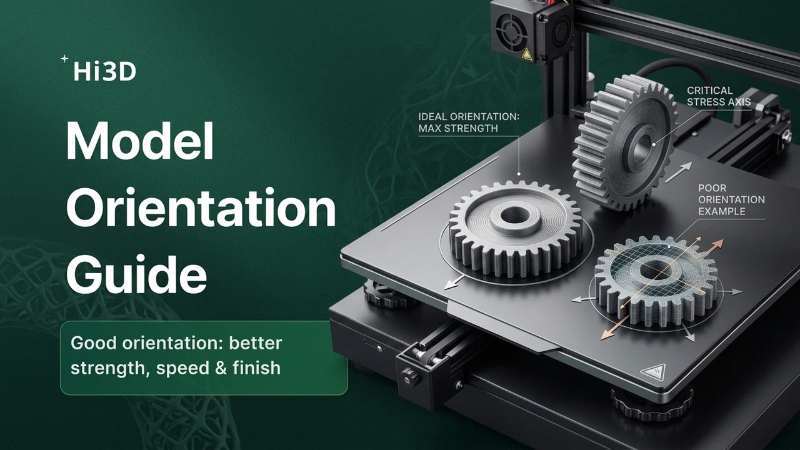
These models are mostly simple-shaped engineering parts. The core requirements are strength and smoothness of large flat surfaces to ensure smooth assembly. Based on the default 0.2 mm strength-oriented parameters, additional optimization for large-flat-surface smoothness is applied. Placing the model with the load-bearing direction perpendicular to the build plate can greatly improve mechanical performance.
Recommended layer height: 0.2 mm
Infill: Cubic, 15%
Large-flat-surface smoothing: Enable Ironing
Ironing type: Topmost surface only
Ironing speed: 30 mm/s
Ironing flow: 10%
Recommended materials: PETG, ABS