AI Color Segmentation Makes It Effortless
Still wondering “How do I split colors in a 3D file?”
With Hitem3D’s AI semantic segmentation, preparing multi‑color 3D models goes from hours to just minutes.
Why Is Multi‑Color 3D Printing So Frustrating?
Have you ever been in this situation?
You download a great-looking OBJ model and want to print it in multiple colors using an AMS system. You import the model into Bambu Studio… and then you stop.
How do you tell the printer which parts should be red, blue, or any other color?
So you start searching:
- “How to split colors in an OBJ file for 3D printing”
- “Bambu Studio multi-color painting tutorial”
- “How to assign different colors to a 3D model”
- “Multi-color 3D printing color separation tips”
After reading tutorial after tutorial, you realize there’s only one answer: manual painting.
You grab the brush tool in the slicer and start painting the model face by face. Rotate the view, paint a bit. Rotate again, fix the edges. Curved surfaces are hard to control, seams are easy to mess up, and tiny gaps get overpainted.
For a moderately complex model, 30 minutes to 2 hours can disappear just like that.
This isn’t an exaggeration.
It’s a daily reality for thousands of 3D printing enthusiasts.
So What’s the Real Problem?
Most 3D files don’t contain color information.
Formats like OBJ or STL store geometry only — they don’t know that “this surface should be red” or “that part should be blue.” If you want a multi‑color print, you have to manually define those regions so the printer knows when to switch filament.
And the “paint by hand” tools in today’s slicers are, honestly, just digital coloring books for 3D models.
They work — but they’re slow, tedious, and easy to get wrong.
What Is AI Color Segmentation — and What Problem Does It Solve?
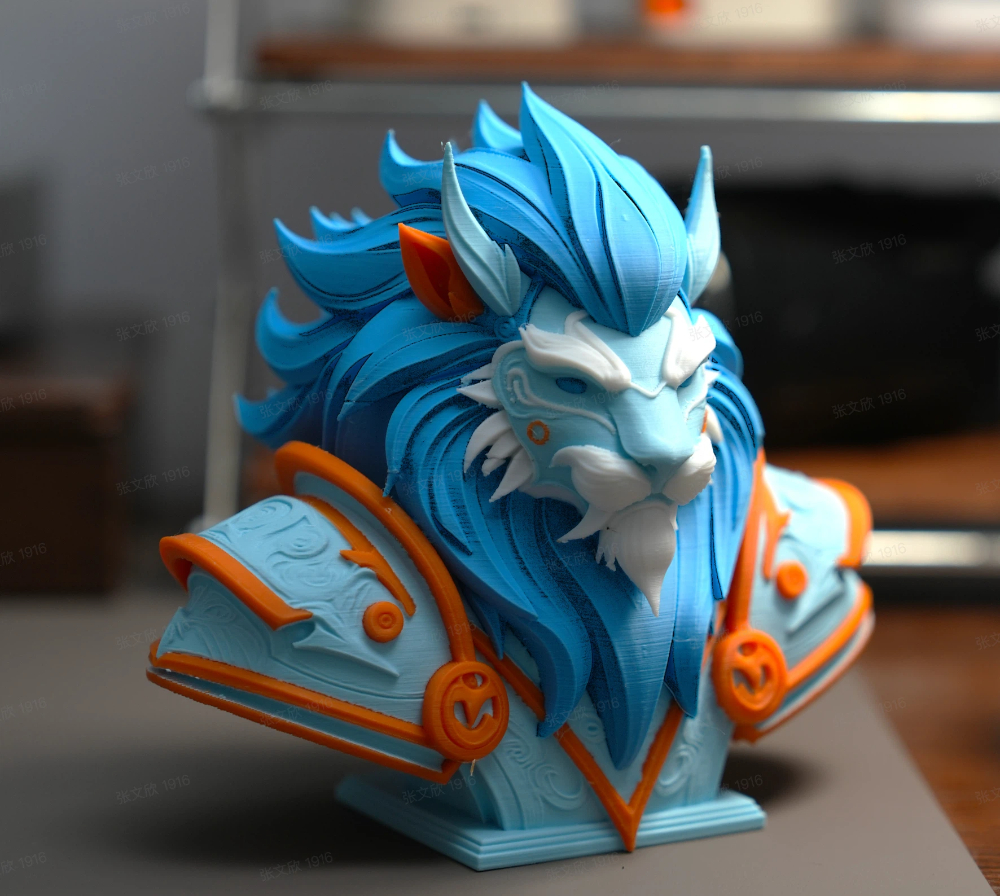
AI color segmentation, simply put, means letting AI automatically identify which parts of a 3D model should be different colors — and separating those regions for you.
You upload a model, and the AI understands its structure:
“This is the head” → assigned Color A
“This is the hair” → assigned Color B
“This is the clothing” → assigned Color C
“These are the eyes” → assigned Color D
You don’t need to manually paint anything.
This is the new feature introduced by Hitem3D: AI Multi‑Color Model Segmentation.
It directly answers the question you’ve probably searched for more than once:
“How can I split colors in a multi‑color 3D print quickly?”
The answer is simple: use AI — and finish it in minutes.
The Three Biggest Pain Points of Manual Color Segmentation
These are also the exact questions people search for most often.
Pain Point 1: “How do I split a model into multiple color regions?”
The traditional approach is simple — and painful.
You manually paint colors in the slicer using a brush tool.
The problem is:
- Complex curved surfaces are extremely hard to paint accurately
- After rotating the model a few times, it’s easy to lose track of what’s already painted
- Jagged boundaries are common, leading to color bleeding in the final print
What looks acceptable on screen often turns into visible color artifacts once printed.
Pain Point 2: “Why does multi‑color 3D printing take so much time?”
For a character bust with around 300,000 polygons, manual color painting takes about 45 minutes on average.
And if you’re not happy with the color layout and want to make changes?
In most cases, that means starting over from scratch.
Pain Point 3: “Is there an automatic color separation tool for 3D printing?”
This is exactly where Hitem3D’s AI color segmentation changes the workflow.
Instead of deciding where to paint colors by hand, the process moves upstream — to AI‑based recognition of the model’s structure and semantic parts.
The workflow shifts from:
“Manually deciding where to paint”
to
“AI generates a complete color separation first, and the user only needs to review or fine‑tune it.”
This marks a fundamental change in multi‑color preparation —
from human‑driven tools to an AI‑first workflow.
How to Use Hitem3D AI Color Segmentation — Done in Three Steps
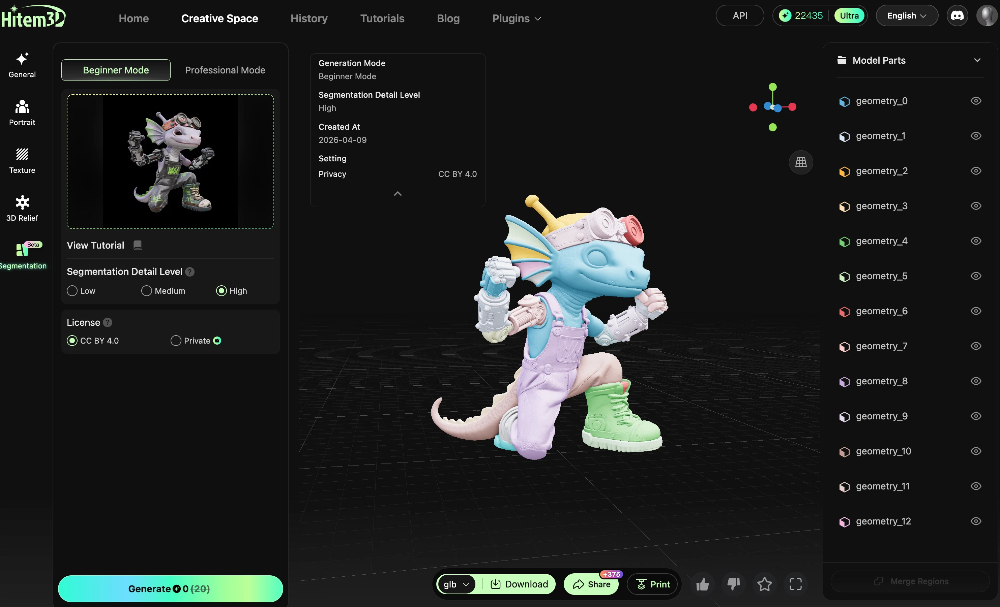
Step 1: Upload an Image or 3D Model
You can start in two ways:
Upload an image and generate a 3D model first, then apply color segmentation —
or upload an existing 3D file directly for segmentation.
Supported formats include OBJ, STL, GLB, USDZ, and FBX, covering most common 3D printing workflows.
Step 2: Choose a Segmentation Mode
Hitem3D offers two modes designed for different experience levels and use cases.
Beginner Mode
Upload your model and let the AI handle everything automatically.
Color segmentation is completed in minutes, making this mode ideal for quick validation and simple models.
Professional Mode
An AI‑first workflow with manual refinement options.
The AI generates an initial color segmentation, and you can then review and edit each color mask. Use tools like lasso selection to adjust boundaries, merge regions, or split areas as needed.
This mode is best suited for complex models or projects that require precise color control.
Step 3: Export and Print
Once you’re satisfied with the result, export the segmented model and send it directly to major slicing and printing platforms such as Bambu Studio.
Multiple export formats are supported, including GLB, OBJ, USDZ, and FBX, making it easy to fit into any existing production pipeline.
Who Is This Feature For?
If you’ve searched for any of the following, this feature was built for you:
- “How to separate color regions in a multi‑color 3D model”
- “Multi‑color 3D printing color separation tutorial”
- “Best software for multi‑color 3D printing”
- “Bambu Studio multi‑color painting is too slow”
- “Automatic color separation tool for 3D models”
- “How to separate colors for multi‑material printing”
- “How to assign different colors in 3D printing”
- “How to split a model into multiple colors”
- “Multi‑color 3D printing preparation tips”
In short: anyone who wants to do multi‑color 3D printing — without spending an hour manually painting a model.
More specifically, this feature is designed for:
Multi‑color printing enthusiasts
Users of Bambu Lab, Prusa, or Anycubic printers equipped with AMS or MMU systems who want faster, cleaner color separation.
Figure and character creators
Makers working with character models that require clear separation between skin, hair, clothing, and other visual elements.
Product and prototype designers
Designers who need to quickly assign color regions to multi‑color prototypes for visualization, validation, or presentation.
3D printing farms
Teams that process large volumes of customer models and need a scalable way to prepare multi‑color prints efficiently.
Educators and makerspaces
Teachers and facilitators who want students to focus on creativity and design — not tedious manual operations.
Get Started
Hitem3D AI Color Segmentation is now officially available.
Try it for free and experience multi‑color preparation in minutes, not hours:
👉 hitem3d.ai